
Overview & Architecture
CRM Integration for Avaya Infinity enables customers, partners, and ISVs to connect a host CRM application with Avaya Infinity Agent. Agents work in their CRM while voice, screen pop, directory, and availability stay synchronized with Infinity.
For setup paths and step-by-step guides by role, see Documentation introduction.
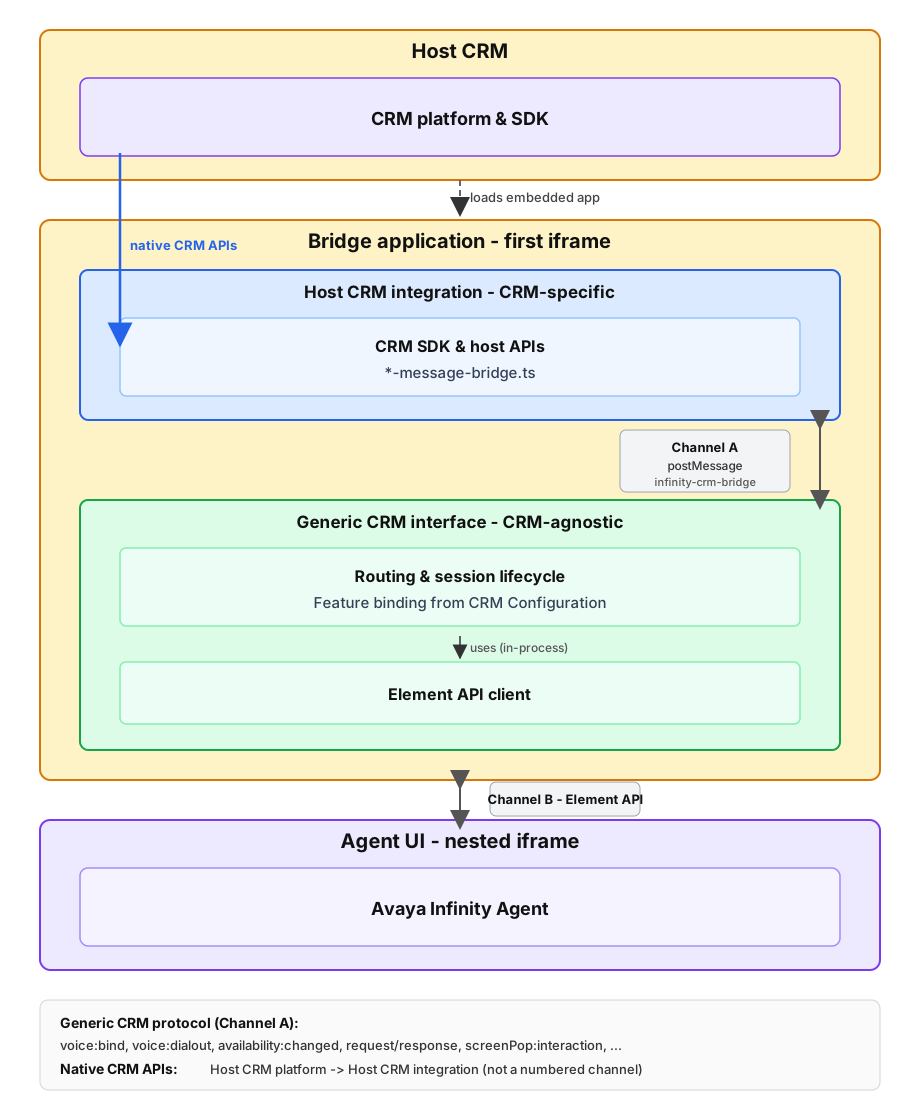
The host CRM embeds a bridge application (first iframe) that connects the CRM platform to Avaya Infinity Agent. Inside the bridge application:
- The Host CRM integration (CRM-specific) talks to the host CRM through native CRM APIs and to the Generic CRM interface through the Generic CRM protocol (
window.postMessageon channelinfinity-crm-bridge). - Generic CRM interface (CRM-agnostic) routes messages, manages the session lifecycle, and talks to Avaya Infinity Agent through the Element API.
As a host CRM integrator, you implement the Host CRM integration for your CRM platform. The Generic CRM interface handles Element API calls and protocol translation inside the bridge application.
Terminology
| Term | Meaning |
|---|---|
| Bridge application | The overall deployed application (first iframe) embedded in the host CRM |
| Generic CRM interface | CRM-agnostic component inside the bridge application — routes messages, binds features, and talks to Agent UI through Element API (sample code in crm/core/) |
| Host CRM integration | CRM-specific component you implement — native CRM APIs plus postMessages on channel infinity-crm-bridge |
| Generic CRM protocol | postMessage contract on channel infinity-crm-bridge between Host CRM integration and Generic CRM interface |
Key capabilities
- Initiate outbound calls and consult calls from the host CRM
- Open CRM records when interactions arrive (screen pop)
- Serve CRM contacts to Infinity Elements (CRM directory)
- Synchronize agent availability between the host CRM and Infinity (omnichannel)
Integration components
| Component | Role | Communication |
|---|---|---|
| Host CRM | Contact list, screen pop UI, availability controls; embeds the bridge application | Native CRM APIs to the Host CRM integration |
| Bridge application | Host CRM integration + Generic CRM interface; loads Agent UI in a nested iframe | Generic CRM protocol internally; Element API with Agent UI |
| Avaya Infinity Agent (Agent UI) | Voice interactions, agent state, inter-element messaging | Element API |
Architecture
The host CRM embeds a bridge application (first iframe). That application contains two components:
| Component | Role |
|---|---|
| Host CRM integration (CRM-specific) | Host CRM SDK, dial-out listeners, directory fetch, availability status subscription, screen pop UI — per-CRM code (for example crm/zendesk/ or _template/) |
| Generic CRM interface (CRM-agnostic) | Routing, session lifecycle, Element API client, feature binding from CRM Configuration |
The bridge application loads Avaya Infinity Agent in a nested iframe (Agent UI). The Agent UI runs voice, interactions, and Elements.
Communication channels
| Channel | Between | Protocol | Purpose |
|---|---|---|---|
| A | Host CRM integration ↔ Generic CRM interface | window.postMessage on infinity-crm-bridge (Generic CRM protocol) | Generic CRM protocol messages (voice:bind, request, availability:changed, …) |
| B | Generic CRM interface ↔ Agent UI | Element API (postMessage) | Voice, agent state, directory inter-element protocol, screen pop triggers |
Native CRM APIs connect the host CRM platform to the Host CRM integration (dial-out events, contact search, status read/write, record navigation). This is not a separate postMessage channel.
As a host CRM integrator you implement the Host CRM integration — native CRM APIs plus the Channel A side in your *-message-bridge.ts. The Generic CRM interface provides Channel B.
Message flow
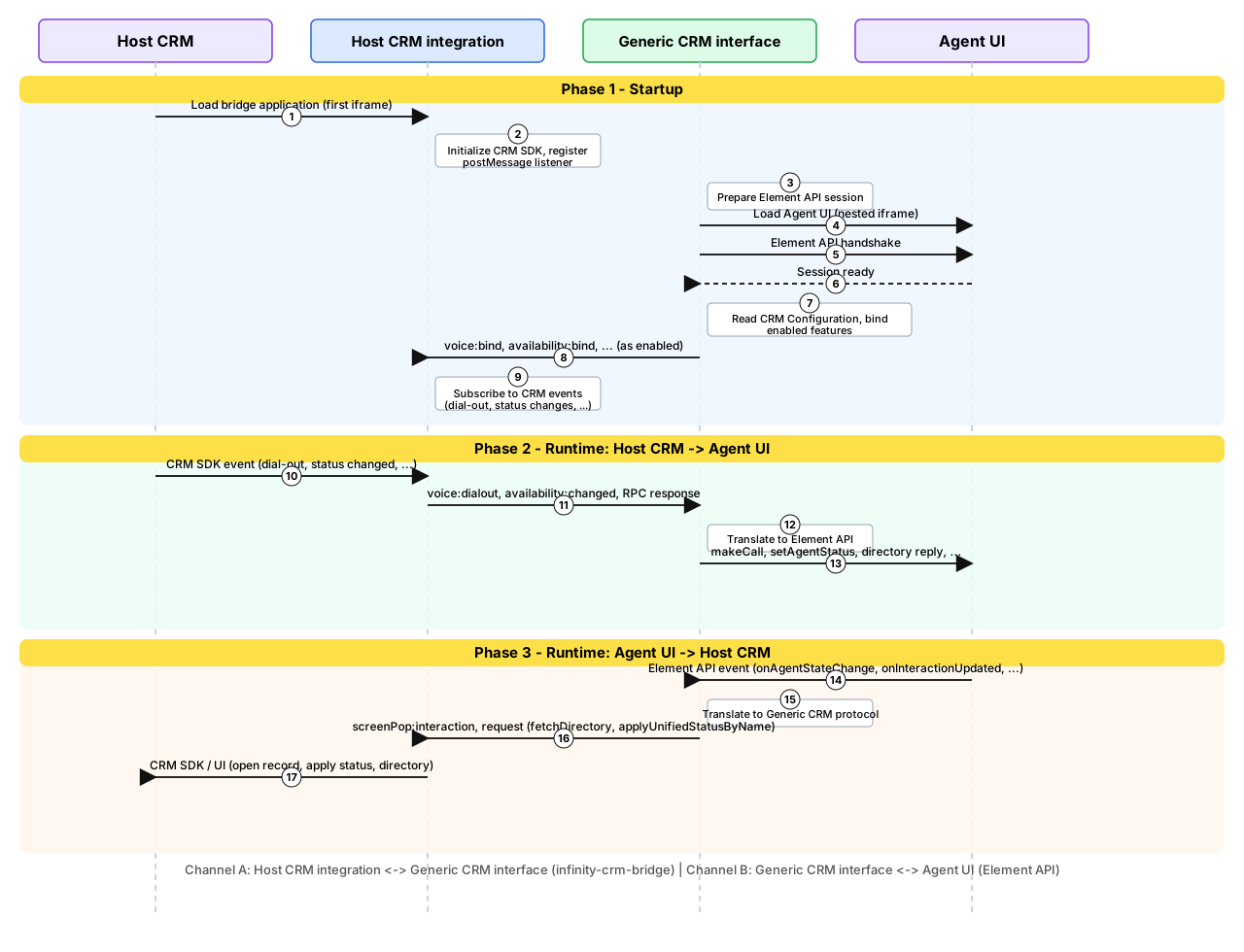
The sequence below shows startup and runtime in both directions: host CRM events forwarded to Avaya Infinity Agent, and Agent UI events reflected back in the host CRM.
Phase 1 — Startup
- Host CRM loads the bridge application (embedded app / first iframe).
- The Host CRM integration initializes the host CRM SDK and registers a postMessage listener on
infinity-crm-bridge. - The Generic CRM interface prepares the Element API session and loads Avaya Infinity Agent in a nested iframe.
- The Generic CRM interface handshakes with Agent UI over Element API; session becomes ready.
- The Generic CRM interface reads the assigned CRM Configuration via Element API and binds enabled features.
- The Generic CRM interface posts bind messages to the Host CRM integration as needed (
voice:bind,availability:bind, …). - The Host CRM integration subscribes to CRM events.
Phase 2 — Runtime: host CRM → Agent UI
Example: user clicks a phone number in the host CRM (click-to-dial) or CRM availability changes (omnichannel).
- Host CRM fires a native SDK event (dial-out, status changed).
- The Host CRM integration posts to the Generic CRM interface on channel
infinity-crm-bridge(voice:dialout,availability:changed, or an RPCresponse). - The Generic CRM interface translates and forwards via Element API (
makeCall,setAgentStatus, directory reply, …). - Agent UI updates — outbound call starts, agent status changes, directory list appears, etc.
Phase 3 — Runtime: Agent UI → host CRM
Example: Infinity agent state changes, an interaction arrives with screen pop data, or the CRM Directory Element requests contacts.
- Agent UI sends an Element API event to the Generic CRM interface (
onAgentStateChange,onInteractionUpdated, directory request, …). - The Generic CRM interface translates to a Generic CRM protocol postMessage (
screenPop:interaction,request+fetchDirectory,applyUnifiedStatusByName, …). - The Host CRM integration handles the message — opens CRM records, fetches directory, writes host status via CRM API.
- Host CRM UI reflects the change (record tab opened, status badge updated, etc.).
See Host CRM Implementation for what the Host CRM integration must subscribe to, fetch, and post. See Generic CRM Protocol for Generic CRM interface side Element API mapping.
Session lifecycle
The Generic CRM interface registers the integration session and binds features after the Element API session is ready. Teardown uses detach — your Host CRM integration posts it on unload; The Generic CRM interface may also post detach during its own shutdown. RPC between the Generic CRM interface and the Host CRM integration uses request / response messages on the same channel.
See Host CRM Integration — Integration lifecycle and Generic CRM Protocol — Session lifecycle.
Features
See CRM Features for the feature index with links to walkthroughs, protocol, configuration, and implementation.
Resources
Documentation introduction | CRM Features | Host CRM Integration | Generic CRM Protocol | Resources
Updated 2 months ago