
Infinity Elements
Overview
Infinity Elements are custom web components you build using the Infinity Extensibility Framework and deploy into the Avaya Infinity Desktop. They extend the agent interface with customized applications, directly embedded in the desktop where agents work.
You build Elements as standard web components (React, Vue, vanilla JS), and the SDK compiles them to run in sandboxed iframes. The Element API provides methods to access agent context, control interactions, and respond to real-time events—all through simple JavaScript calls.
Some examples of what you could build include:
- CRM integrations that display customer data during interactions
- Knowledge bases searchable without leaving the desktop
- Custom dashboards showing team metrics and queue stats
- Workflow tools for ticketing, payments, or case management
- Coaching panels providing real-time agent guidance
Element Types
The framework supports two element types based on where they display and how they behave:
App-Level Infinity Elements
Persistent components in the left navigation bar that remain available throughout the agent session.
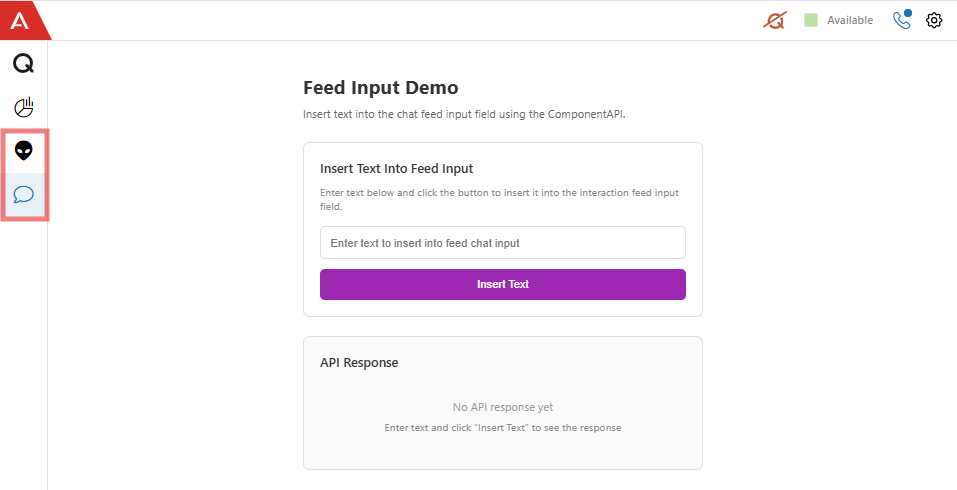
Avaya Infinity Desktop - w Infinity Elements added on left navigation options
- Display: Left navigation sidebar (alongside Team View, Analytics)
- Lifecycle: Load at login, persist until logout
- Context: Global—must specify
interactionIdfor interaction-specific API calls - Use for: Dashboards, knowledge bases, productivity tools
Interaction-Level Infinity Elements
Context-aware widgets bound to specific customer interactions, displayed as tabs in the interaction workspace.

Avaya Infinity Desktop - Active Chat w/ Infinity Element in Sidebar
- Display: Tabs within the interaction area
- Lifecycle: Created when interaction arrives, destroyed when it ends
- Context: Automatically tied to current interaction—no
interactionIdneeded - Use for: CRM displays, case management, transaction processing, customer history
Resources
Infinity Elements Documentation | Admin Portal Documentation
Updated 8 months ago