
Real-time Contextual Media Streaming
Bring Your Own AI to Avaya Infinity
Real-time Contextual Media Streaming is an open WebSocket-based protocol that lets you connect your own AI services directly to Avaya Infinity. Build a WebSocket server, point Avaya Infinity at it, and your AI is live on the call — hearing, speaking, and exchanging events in real time.
No proprietary SDKs. No middleware. Just a WebSocket connection carrying bidirectional audio and structured JSON messages.
What You Can Do Today
Virtual Agent Integration
Deploy your own conversational AI as a first responder in your Avaya Infinity contact center. Whether you're building on OpenAI, Anthropic, or your own models, Real-time Contextual Media Streaming gives your bot a direct line into the live call.
How it works:
-
Build your WebSocket server to the Real-time Contextual Media Streaming specification. It receives real-time audio, processes it through your AI, and sends audio and events back.
-
Configure your endpoint in the Avaya Infinity admin console — just a WebSocket URL and credentials.
-
Select your Virtual Agent profile in your Avaya Infinity workflow, alongside IVR, queues, and skill-based routing.
-
Connect — when a call hits your Virtual Agent step, Avaya Infinity opens a live WebSocket connection. Audio flows both ways instantly. Your AI is on the call.
-
Escalate — when a human is needed, your AI sends a handoff event with the full transcript, sentiment, extracted entities, and any custom context. The agent picks up with complete intelligence. No one repeats themselves.
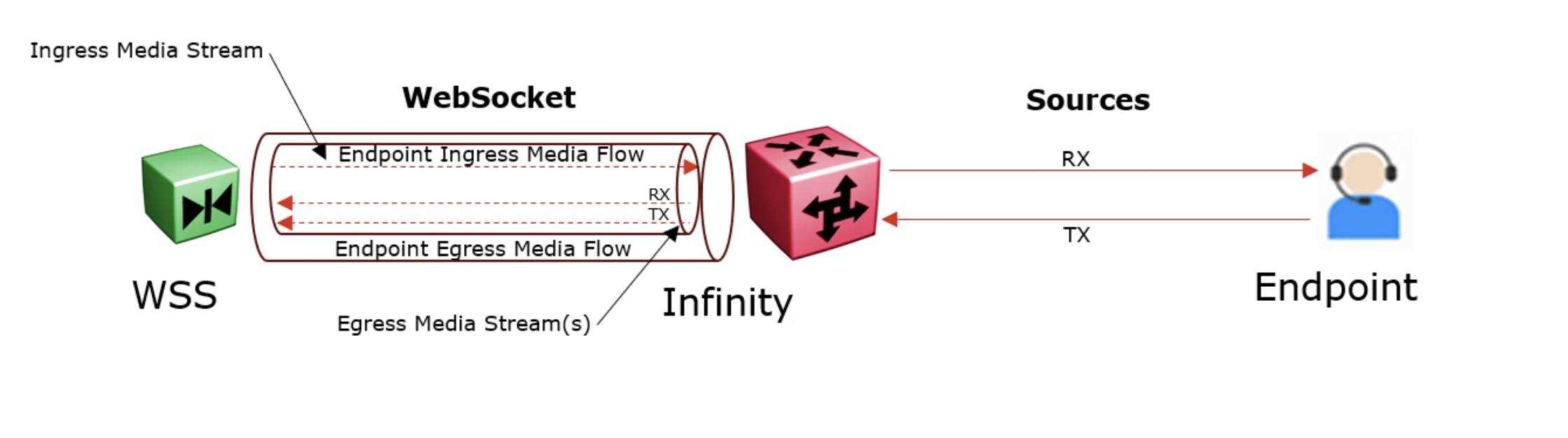
The single WebSocket connection carries two streams simultaneously: bidirectional audio and bidirectional events. Your AI hears and speaks in real time — it's not processing a recording after the fact.
Media Flows
A single WebSocket connection between Avaya Infinity and your Real-time Contextual Media Streaming server carries media for multiple endpoints (participants) on a call. Each endpoint has two optional, independent media flows:
- Egress (out) (Avaya Infinity → Your Server) — live audio from the endpoint, streamed to your server for processing. Used by bots, recording, ASR, and agent assist.
- Ingress (in) (Your Server → Avaya Infinity) — audio generated by your server, played back to the endpoint. Used by bots (AI responses) and TTS.
A Virtual Agent bot typically uses both flows: it receives the customer's speech (egress) and sends AI-generated audio back (ingress). A recording service uses egress only. A TTS service uses ingress only. Your server controls which flows are active per endpoint.
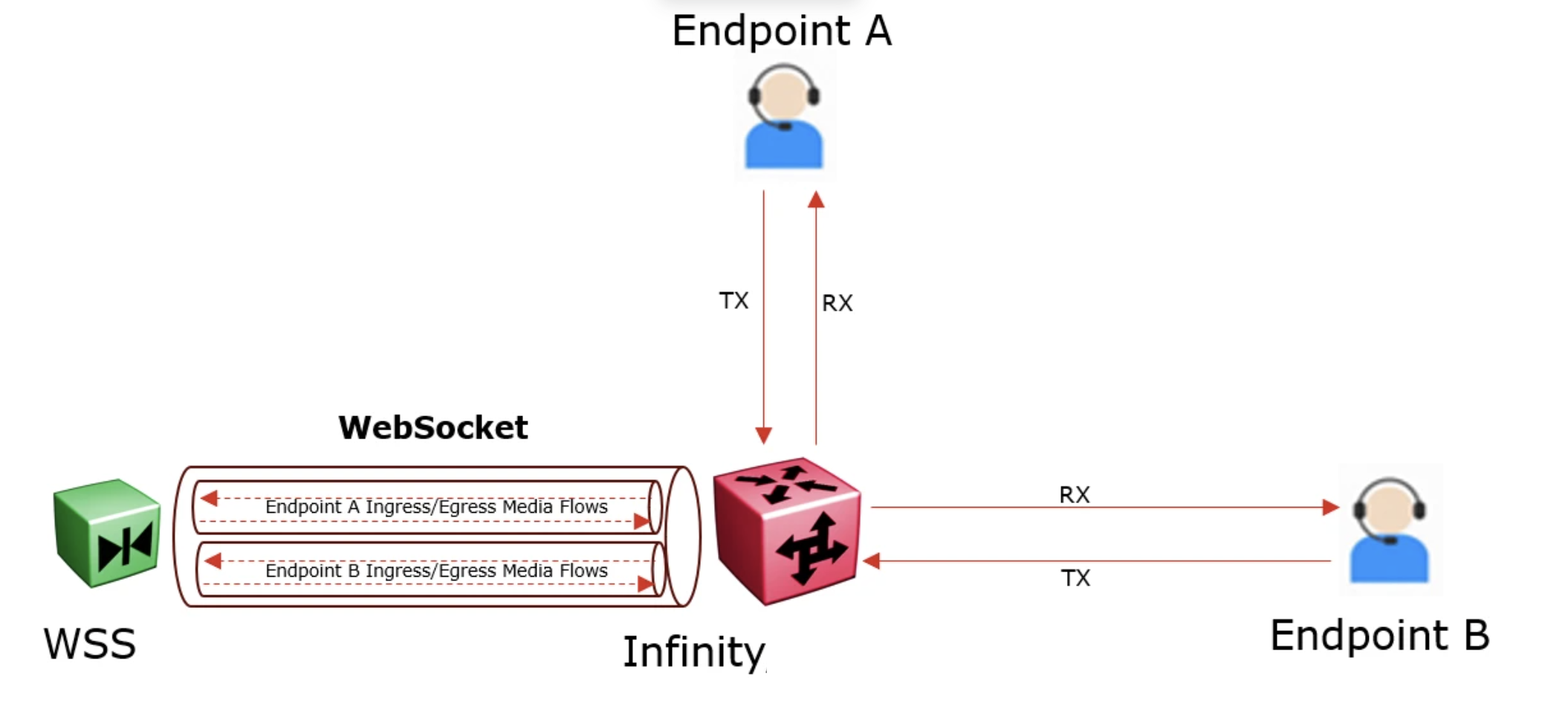
All flows are multiplexed over the same WebSocket connection. Avaya Infinity handles codec negotiation, session multiplexing, and routing — your server simply reads and writes audio frames tagged by endpoint ID.
Coming Soon
Real-time Contextual Media Streaming is designed as an extensible protocol. The same foundation that powers Virtual Agent will support additional services:
| Service | Description | Direction |
|---|---|---|
| Agent Assist | Real-time AI support for live agents — transcription, knowledge suggestions, smart replies, summarization | Avaya Infinity → Your Server |
| Recording | Bring your own recording provider with built-in media buffering for resilience | Avaya Infinity → Your Server |
| Text-to-Speech | Custom TTS providers for branded voice experiences | Your Server → Avaya Infinity |
| Speech Recognition | Custom ASR engines optimized for your language and domain | Avaya Infinity → Your Server |
| Transcription | Live speech-to-text for agents, supervisors, and compliance | Avaya Infinity → Your Server |
| Translation | Real-time translation between participants speaking different languages | Bidirectional |
All services use the same protocol and can run multiplexed over a single WebSocket connection.
Technical Overview
Architecture
Avaya Infinity initiates all connections and acts as the WebSocket client. Your server listens for incoming connections. No inbound firewall rules required on your side — Avaya Infinity reaches out to you.
Transport Modes
Real-time Contextual Media Streaming supports two transport modes:
| Mode | Signaling | Media | Best For |
|---|---|---|---|
| avaya-wss | WebSocket (TLS) | Binary frames over WebSocket | Simplicity, broad compatibility |
| avaya-wss-rtp | WebSocket (TLS) | SRTP over UDP | Ultra-low latency environments |
Both modes use JSON for control messages and support dynamic codec negotiation.
Security
- TLS 1.2+ encryption on all connections
- Public CA certificates required (no self-signed)
- JWT authentication — Avaya Infinity sends a signed token, your server validates it
- Session isolation with per-connection security context
Media
- Codecs: PCMU (8 kHz), PCMA (8 kHz), G.722 (16 kHz)
- Frame size: 20ms default, configurable per session
- Channels: Customer audio, agent audio, or both — negotiated at session setup
Protocol
- JSON message envelope with version, type, session ID, sequence number, and timestamp
- Built-in keep-alive, graceful shutdown, and automatic session recovery
- Message batching for reduced setup latency
- Support for multiplexing multiple services on one connection
Get Started
1. Read the Protocol Specification
The complete Real-time Contextual Media Streaming specification covers session lifecycle, message definitions for all services, media encoding, security requirements, error handling, and wire trace examples. It's comprehensive and structured for use with AI coding assistants — feed it to your tool of choice and start building.
Download Real-time Contextual Media Streaming Protocol Specification v1.1 (PDF)
2. Try the Sample Server
A reference implementation demonstrating a production-ready Real-time Contextual Media Streaming server for the Virtual Agent use case. Includes session management, audio streaming, event handling, and error recovery patterns.
Questions?
For integration support, contact your Avaya representative or visit the Avaya Infinity developer community. We're here to help you get your AI live on the call.
Updated 6 months ago